A Beginner’s Guide to Programmatic SEO (In Simple Words!)

Have you ever searched for something on Google like:
- “Birthday invitation templates”
- “Resume templates for students”
- “Instagram post ideas”
If you have, you’ve probably seen results from websites like Canva or Zety. These websites have thousands of pages showing up on Google — and they didn’t write each one by hand. That’s the magic of Programmatic SEO.
Let’s break it down in a super simple way.
What is Programmatic SEO?
Programmatic SEO is a way to create lots of helpful pages for your website using data and templates instead of writing each page one-by-one.
Instead of writing 1 blog post for 1 keyword, you create a template that can be used again and again, filling in the blanks with different keywords.

Why Do It?
Let’s say you have a website that helps people find workouts.
If you wanted to make a page for:
- "Beginner workouts for men"
- "Beginner workouts for women"
- "Beginner workouts for seniors"
- "Advanced workouts for athletes"
...and hundreds more…
You’d have to write a ton of pages manually. With programmatic SEO, you make one smart template, and the computer fills in the details.
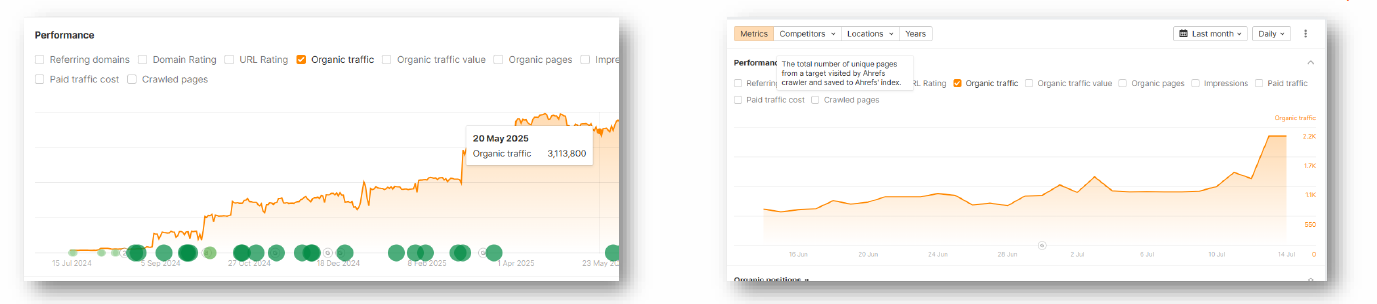
By covering so many keywords, you get traffic quickly
One Keyword per Page
This is super important:
👉 Each page should focus on one main keyword or topic.
That keyword tells Google what the page is about, and helps people find it. If you mix too many keywords into one page, Google gets confused, and the page may not rank well.
For example:
- Page 1: “Resume templates for students”
- Page 2: “Resume templates for teachers”
- Page 3: “Resume templates for graphic designers”
Each of these has one clear focus.
How the URL Works
A URL is the link or web address of your page. It’s also important for SEO.
Good programmatic SEO URLs are:
- Clear
- Keyword-friendly
- Easy to read
Example:
https://example.com/resume-templates-for-students
Google and people prefer the first one. It tells you exactly what the page is about.
Real-Life Example: Canva
Canva is a perfect example of programmatic SEO done right.
Let’s look at some of their URLs:
https://www.canva.com/resumes/student/https://www.canva.com/invitations/birthday/https://www.canva.com/posters/fitness/
Each page is based on a template, and the keyword changes: “student resume,” “birthday invitation,” “fitness poster.”
They didn’t write each of these by hand — they used smart templates and data. That’s how they show up for so many searches!
Final Thoughts
Programmatic SEO is like using building blocks. You create a smart structure and let the data fill in the rest.
To do it well:
- Pick one keyword per page.
- Use clean, keyword-friendly URLs.
- Build useful templates that serve real needs.
- Use examples like Canva to inspire your own ideas.